GETTY IMAGES: DESIGN PROCESS FOR CUSTOMER SUPPORT
OLD DESIGN

Getty Images sells imagery to customers in two ways; creative stock and editorial stock. It is a complicated space and many different groups use the site; subscription customers ... a la carte customers ... full-time photographers ... part-time photographers ...
You get the picture.
This customer support page was to help customers and to redirect photographers to their own "Help" portal (That was separate work--ask me about it).
PROBLEM:
User needed help to navigate GettyImages.com
-
Contact Us page was out-of-date
-
Self-service didn’t work because the FAQ information was removed because it was out-of-date
-
The contact information for local sales offices was incorrect
-
There was no way to automatically connect the customer with a sales account person if they had one
-
This page was not mobile enabled.
-
Redirect photographers to their "help" portal.
PROCESS: WHITEBOARDING, WIREFRAMING & USERFLOWS
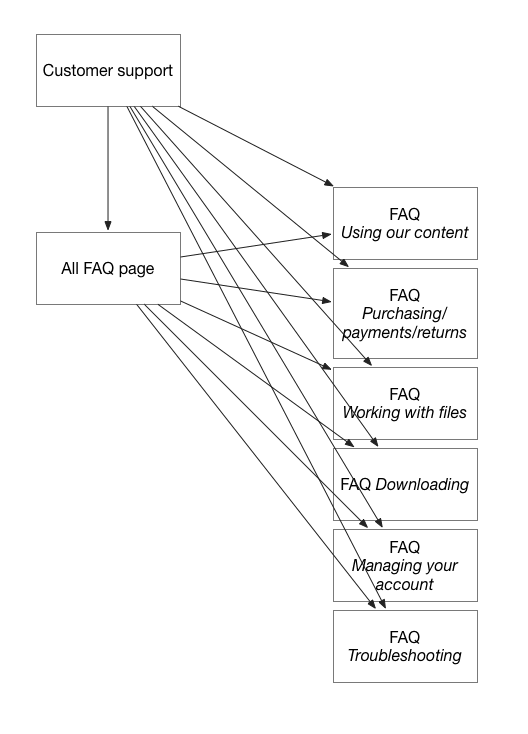
I brainstormed solutions with my developers and business partners by whiteboarding, wireframing and showing them user flows. You can see some samples here.




NEW DESIGN
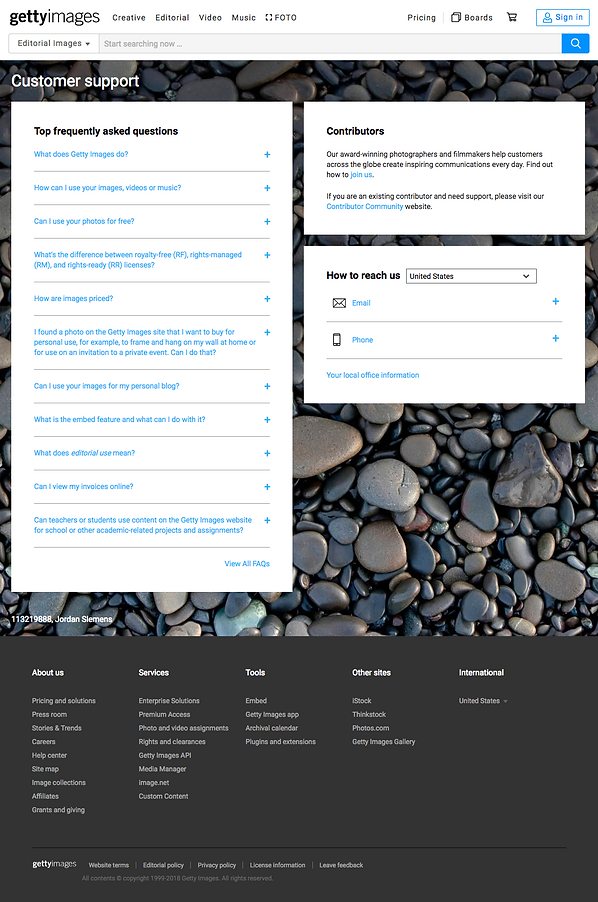

We the following adjustments
-
Make Contact Us became a hub for information; Customer Support
-
Add FAQ section to enable customers to self-serve
-
Contact information for local offices was verified and updated
-
SalesForce was implemented and connected to the phone number, so customers could reach their assigned sales rep
-
Make page responsive for mobile customers
RESULTS:
We reduce overall number of calls to Customer Support by including self-service with the FAQs.
We increased the number of "qualified calls" by sending users to a help "channel" most appropriate for them.
This information was verified by sales account ticket and site analytics

NEW FAQ INDEX

NEW FAQ PAGE
